Having Some Rice
I have an old netbook. Its hardware is old and slow. I also have no practical reason to use it when other devices like my PC or even my phone are better for pretty much anything I might want to do with it…
However, this old netbook has accompanied me throughout my entire time at university and I have grown emotionally attached to it. On top of that, there is something else I love to do every now and then: Fiddling with Linux distrubutions and customizing them.
And this is how we get to today’s topic: I’ve spent some time over the last weeks to keep the old netbook up to date and customize it (aka. “rice it”, in the Linux nerd jargon) by making my own desktop.
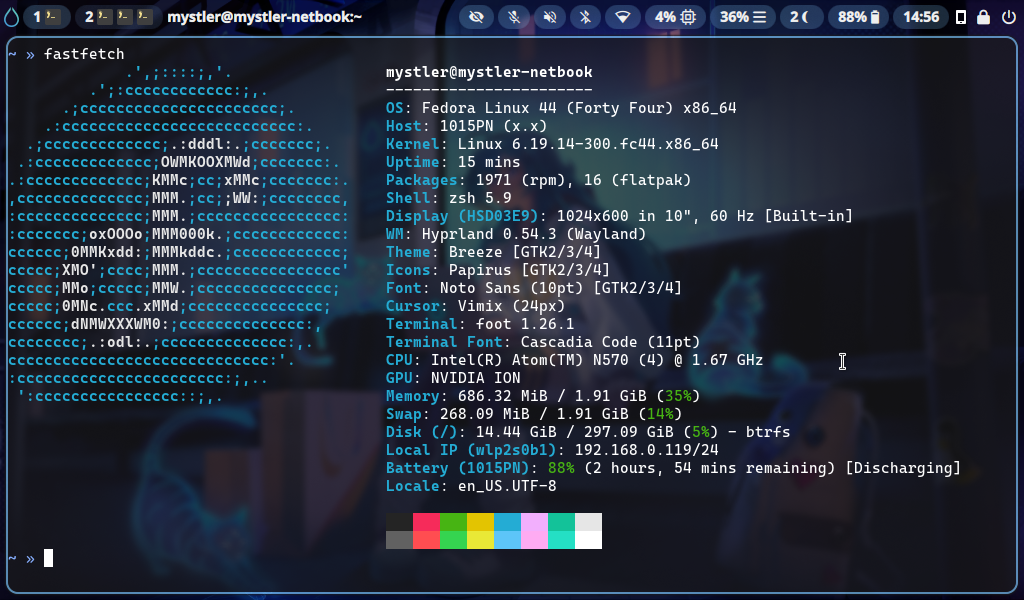
This is not the first time I’ve done customizations but it is probably the time I went the furthest and felt like it might actually be interesting to share some insight into what I did.
For the past two years or so, I had been running a Fedora installation on it, using the Fedora Everything minimal net installer with KDE for the desktop. I generally like KDE a lot but it was also a fact that full-fledged desktop environments are causing heavy slowdowns on the netbook. Just idling after login was already consuming 1.3GB of the available 2GB of RAM. Starting anything, even just system settings was slow.
Then, recently, I had the sudden urge to try going much simpler, by abandoning DEs altogether and using a window manager. At first, I tried Sway but I did not like it all that much and ran into some issues. Idle usage was so much lower though that I immediately realized that I was on the right track. Next, I installed Hyprland. I have seen it before using Sway, but since it was advertising itself with fancy effects and animations, I was worried it would mean it has higher consumption and runs slower. I was wrong. It worked better than Sway for the same usage. Configuring Hyprland was straightforward and fun with immediately visible results. Hooray!
At this point, I may need to clarify some things for readers that are not familiar with the nature of a window manager. The differences between a WM and a desktop environment like KDE are that, while KDE comes with everything you know from a classic desktop, like a taskbar, app launcher, apps to change settings, font and theme customization, and more, a window manager purely does what it says on the can: manage windows. Hyprland provides a base layer that handles how new windows are opened and displayed. On top of that window managers are usually tiling. While a typical Windows or KDE desktop have floating windows that you drag around anywhere on a screen, a tiling window manager automatically sizes and aligns new windows in a grid. It is designed for power users that want to effectively manage their screen space with automation and use multiple workspaces in parallel. The first reaction of most people hearing about this for the first time is likely: “Ehh, that sounds strange and tedious.” Tiling window managers are a case of, you need to try it out for yourself to realize where its strengths are compared to floating windows. That being said, Hyprland also supports things like floating, pinned, and fullscreen windows, of course. It is just the basic paradigm that is different.
With Hyprland running as the underlying window manager and providing visuals and controls for and arranging applications, the question was now how to build an “actual desktop” and add features that the window manager does not offer. One key part that I wanted is a status and taskbar. At first, I went with Waybar for a while. Waybar is great in how simple it is to set up. With just two config files, one to specify what modules you want and what information you want them to show, and one stylesheet to customize the looks, it served my needs well.
Later on, I found out about Quickshell though. Quickshell is much harder to set up and requires programming in QML to use, but it allows for even more customization. With Quickshell, you get a QML framework using Qt Quick with which you can develop your own desktop shell to whatever extend you desire. Thus, I set out to build a lot of my desktop shell all with Quickshell. I created my own taskbar with several status indicators and buttons, custom tray menu styles, a logout/shutdown screen, and a custom application launcher.
Things like consistent fonts and consistent coloring are pretty important to me and this approach allowed me to get something I find both functional as well as visually pleasing. After spending some time on that and building things as far as I wanted to have them on my netbook, I am now in a spot that I am pretty happy with. And during idle time, this setup consumes barely above half of the memory that KDE did.
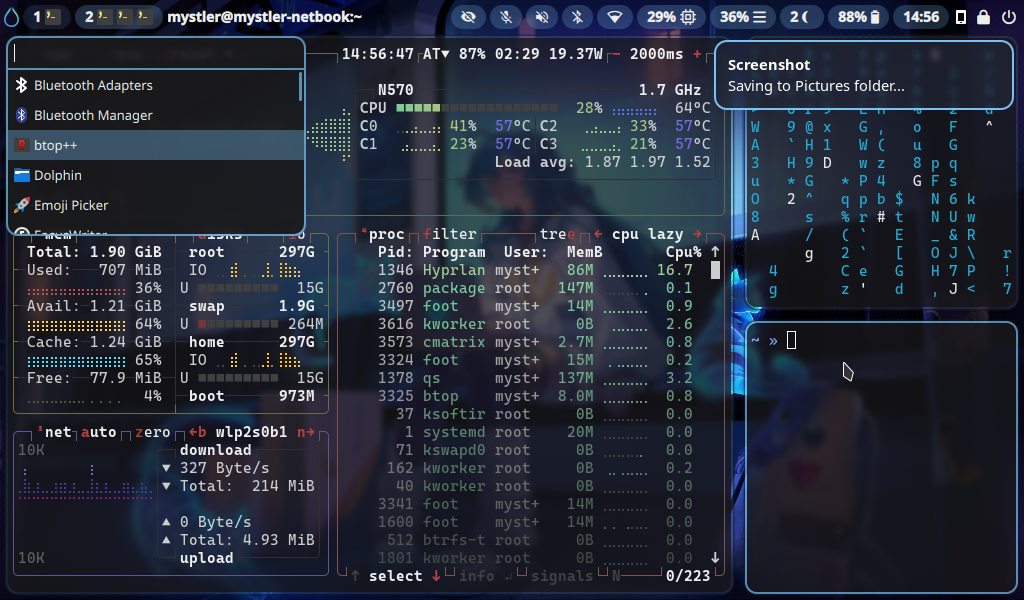
For everyone with a more technical interest, here is a summary of the stack involved in my desktop at the time of writing:
- Hyprland: Window Manager (also using additional packages like Hyprpaper, Hyprlock, and Hypridle)
- Quickshell: Handwritten taskbar with status indicators, tray menus, app launcher, and logout screen.
- Mako: Basic notifications daemon
- Snappy Switcher: Alt+Tab workspace switching
- Zsh + Oh My Zsh: Shell
- Foot: Terminal client
Special note on Mako and Snappy Switcher: Indeed, I could also do notifications and an alt+tab display all with Quickshell. I just decided against re-inventing the wheel for these two when they already serve my needs fine at no noteworthy resource cost.
Special note on Foot: There are many, many Terminal clients out there. I probably would have used Alacritty or Kitty, but those are all GPU-accelerated and turned out to be a lot slower on my old netbook than a CPU client. Foot turned out to be blazing fast and a perfect fit.
Another side effect of working on this environment is that I have adopted Neovim (with LazyVim) as a primary editor, even using it through WSL on my Windows PC now.
My dotfiles for my configuration are available on GitHub.
I hope this post could give some glimpse into the world of Linux ricing. I encountered some fun tools on the way that, maybe, you are inspired to check out yourself. The ability to make your system whatever you want is one of they key strength of Linux environments, in my opinion. If this sounds intriguing to you and you are inspired to experiment with these things on your own, then I wish you a pleasant journey.